XP-Pen Deco 640 vs XP-Pen Deco 01 V3: Which Drawing Tablet Is Better in 2026?
Choosing the right drawing tablet can make a noticeable difference in digital drawing, graphic design, photo editing, online teaching, and other creative tasks. For users looking for a reliable XP-Pen tablet without moving to an expensive pen display, two interesting options in 2026 are the XP-Pen Deco 640 and XP-Pen Deco 01 V3.
Both tablets offer 16,384 levels of pressure sensitivity, battery-free styluses, tilt support, and compatibility with major operating systems. However, they are designed for slightly different types of users.
The Deco 640 focuses on portability, a compact workspace, and affordability, while the Deco 01 V3 gives artists a significantly larger active area and dedicated shortcut keys.
So, which one should you buy?
In this XP-Pen Deco 640 vs XP-Pen Deco 01 V3 comparison, we will compare their active areas, pressure sensitivity, stylus performance, portability, shortcut keys, compatibility, pricing, and overall value.
XP-Pen Deco 640 vs Deco 01 V3: Quick Comparison
| Feature | XP-Pen Deco 640 | XP-Pen Deco 01 V3 |
|---|---|---|
| Active Area | 16 × 9 cm (approx. 6.3 × 3.5 inches) | 10 × 6.25 inches |
| Pressure Sensitivity | 16,384 Levels | 16,384 Levels |
| Tilt Support | 60° | 60° |
| Resolution | 5080 LPI | 5080 LPI |
| Shortcut Keys | No dedicated express keys listed | 8 Customizable Keys |
| Stylus | Battery-Free P01 (16K) | Battery-Free Stylus |
| Report Rate | ≥220 RPS | Up to 266 RPS |
| Connectivity | USB-C | USB |
| Best For | Portability, beginners, compact desks | Drawing, design & larger workspace |
| Listed Price* | Rs. 10,900 | Rs. 17,900 |
*Prices are based on the listings available at the time of writing and may change.
XP-Pen Deco 640 Overview
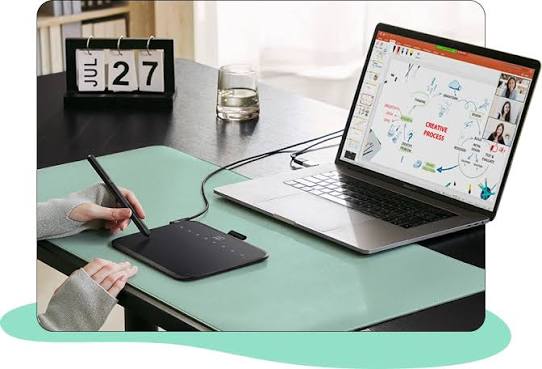
The XP-Pen Deco 640 is a compact drawing tablet designed for users who want a portable and affordable option without sacrificing important pen features.
Its active area measures 16 × 9 cm, while the complete tablet measures approximately 149.96 × 188.34 × 7.7 mm. This compact size makes it particularly useful for students, beginners, laptop users, and designers who frequently move between different workspaces.
Despite its smaller size, the Deco 640 provides 16,384 pressure levels and supports up to 60 degrees of tilt.
The tablet also features 5080 LPI resolution, a reading height of 10 mm, a report rate of at least 220 RPS, and USB-C connectivity.
If portability and price are your main priorities, the Deco 640 offers a strong combination of modern specifications and a compact design.
Product Link: Buy XP-Pen Deco 640
XP-Pen Deco 01 V3 Overview
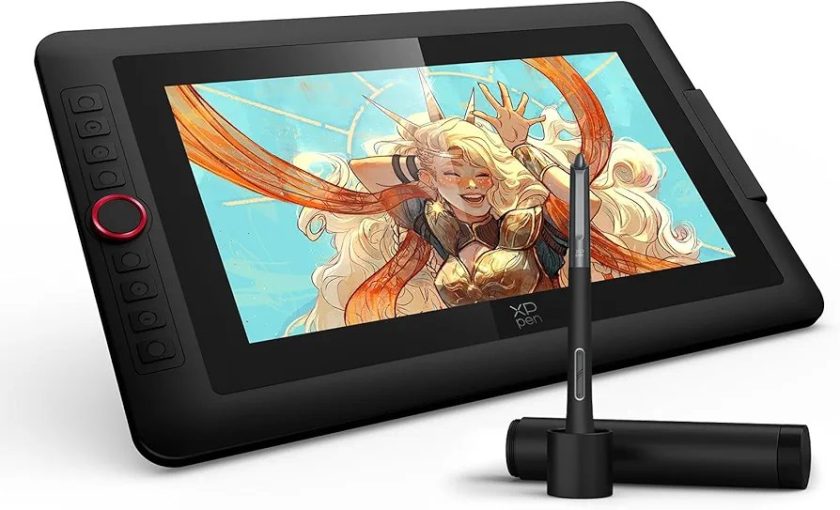
The XP-Pen Deco 01 V3 takes a different approach. Instead of focusing primarily on compactness, it provides creators with considerably more working space.
Its 10 × 6.25-inch active area provides enough room for broad strokes, detailed illustrations, photo retouching, digital painting, and graphic design.
The Deco 01 V3 is only around 8 mm thick, so despite its larger drawing surface, it remains relatively slim and portable.
It also comes with eight customizable express keys. These can be configured for frequently used commands in compatible creative applications, helping users reduce their dependence on a keyboard while working.
Like the Deco 640, it offers 16,384 pressure levels, 60-degree tilt support, 5080 LPI resolution, and a battery-free stylus.
Product Link: Buy XP-Pen Deco 01 V3
1. Active Area and Drawing Experience
The biggest difference between these two drawing tablets is their working area.
The Deco 640 provides a compact 16 × 9 cm active area. This is useful when working on a small desk or carrying the tablet alongside a laptop.
However, artists who frequently create detailed illustrations may eventually prefer more space.
The Deco 01 V3 provides a 10 × 6.25-inch active area, giving your hand considerably more room to move naturally.
A larger drawing surface can be especially helpful when working on detailed artwork because smaller hand movements do not need to cover as much screen distance.
For digital artists, illustrators, and professional designers, the Deco 01 V3 wins in working-area comfort.
For portability, the Deco 640 has the advantage.
2. Pressure Sensitivity
Pressure sensitivity determines how effectively the tablet detects differences between lighter and heavier pen strokes.
Both models provide an impressive:
16,384 levels of pressure sensitivity.
This means both tablets can respond to subtle changes in pressure when you’re using compatible drawing software.
Light pressure can produce thin strokes, while increasing pressure can create thicker or stronger strokes depending on the selected brush settings.
For digital painting, handwriting, sketching, and illustration, this creates a more natural pen experience.
There is effectively no major winner in pressure sensitivity because both models offer 16K pressure levels.
3. Stylus and Tilt Support
Both tablets use a battery-free stylus, eliminating the inconvenience of charging your pen before starting a creative session.
Both models also support up to 60° tilt.
Tilt recognition can be particularly useful when using brushes that respond to pen angle. For example, artists can create more natural shading effects by holding the stylus at different angles.
This makes both tablets suitable for:
- Digital illustration
- Sketching
- Painting
- Photo editing
- Graphic design
- Digital handwriting
The combination of 16K pressure sensitivity and tilt support makes both tablets competitive choices for modern creative workflows.
4. Shortcut Keys
This is another important difference.
The Deco 01 V3 features eight customizable express keys. You can configure these buttons for frequently used commands depending on your workflow and software.
For example, they can potentially be used for actions such as undo, switching tools, changing brush functions, or other software shortcuts.
This can significantly improve workflow efficiency for users who spend several hours drawing or editing.
The Deco 640 product specifications focus more on its compact drawing surface and do not list the same eight dedicated express keys.
Therefore, users who rely heavily on shortcuts will likely find the Deco 01 V3 more convenient.
5. Software and Operating System Compatibility
Compatibility is strong on both devices.
The Deco 640 supports major platforms including Windows, macOS, Android, Chrome OS, and Linux.
The Deco 01 V3 also supports Windows, macOS, Android, Chrome OS, and Linux, with its product listing mentioning compatibility with major creative applications such as Photoshop, Illustrator, SAI, Painter, and Clip Studio.
This makes the tablets useful beyond traditional digital art.
You can potentially use a drawing tablet for:
- Graphic designing
- Digital signatures
- Online teaching
- Photo retouching
- Illustration
- Animation workflows
- Digital note-taking
- Presentations
- Remote learning
You can explore more models through the XP-Pen Pakistan website if you want to compare these tablets with other available options.
6. Portability and Desk Space
If you frequently travel with your laptop, the Deco 640 is particularly attractive.
Its compact dimensions allow it to fit more easily into a laptop bag, and it requires less desk space.
This makes it suitable for university students, freelancers, office users, and creators who work from multiple locations.
The Deco 01 V3 is considerably larger because of its 10 × 6.25-inch active area. However, it is only around 8 mm thick, which helps maintain portability despite the larger footprint.
The choice comes down to priorities:
Choose Deco 640 for maximum portability.
Choose Deco 01 V3 for maximum drawing space.
7. Which Is Better for Beginners?
Both models are beginner-friendly, but the Deco 640 can be particularly appealing to someone buying their first drawing tablet on a limited budget.
It provides the core features most beginners need without requiring a large investment.
The Deco 01 V3 makes more sense if you’re a beginner who expects to continue developing digital-art or graphic-design skills over the long term.
Its larger workspace and customizable shortcut keys provide additional room to grow into more advanced workflows.
For users exploring more affordable and compact options, you can also check the XP-Pen Deco Fun S.
8. Which Is Better for Graphic Designers?
For regular Photoshop, Illustrator, photo-editing, and graphic-design work, the Deco 01 V3 is our preferred option.
The main reasons are simple:
A larger active area provides better freedom of movement, while eight customizable shortcut keys can help speed up repetitive actions.
The Deco 640 can certainly handle graphic-design work, but its smaller surface is better suited to users who prioritize portability over workspace.
Professional creators looking for additional XP-Pen options can also explore the XP-Pen Deco L.
9. XP-Pen Deco 640 vs Deco 01 V3 Price in Pakistan
At the time of writing, XP-Pen Pakistan lists the:
XP-Pen Deco 640 at Rs. 10,900
and
XP-Pen Deco 01 V3 at Rs. 17,900.
Prices and promotions can change, so always check the individual product pages for the latest price before purchasing.
The Deco 640 is clearly the more affordable option.
However, the additional cost of the Deco 01 V3 gives you a substantially larger active area and eight customizable express keys.
Therefore, the cheaper tablet is not automatically the better-value tablet for every user.
XP-Pen Deco 640 vs Deco 01 V3: Which Should You Buy?
The final decision depends primarily on how you plan to use your drawing tablet.
Buy the XP-Pen Deco 640 if:
You want an affordable drawing tablet, frequently travel with your laptop, have limited desk space, or simply prefer a compact drawing surface.
Its 16K pressure-sensitive stylus, tilt support, USB-C connection, and compact dimensions make it an excellent entry point into digital drawing.
Check XP-Pen Deco 640 Price & Availability
Buy the XP-Pen Deco 01 V3 if:
You want more room for drawing, frequently work in Photoshop or Illustrator, create detailed digital artwork, or want customizable shortcut keys.
Its combination of a 10 × 6.25-inch active area, eight express keys, 16,384 pressure levels, and tilt support makes it the stronger overall option for serious creative work.
Check XP-Pen Deco 01 V3 Price & Availability
Final Verdict
In the XP-Pen Deco 640 vs XP-Pen Deco 01 V3 comparison, there isn’t a single winner for every type of user.
The XP-Pen Deco 640 is the better choice for portability, compact setups, and budget-conscious buyers. It provides impressive stylus specifications while keeping the overall tablet small and affordable.
The XP-Pen Deco 01 V3 is the better overall choice for digital artists and graphic designers who value workspace and productivity. Its much larger active area and eight customizable shortcut keys make long creative sessions more comfortable and efficient.
If your budget allows and portability isn’t your biggest concern, we would choose the Deco 01 V3.
If you’re looking for a compact and affordable drawing tablet with modern pressure sensitivity, the Deco 640 offers excellent value.
Browse more XP-Pen drawing tablets in Pakistan to find the model that best matches your budget and creative workflow.
Frequently Asked Questions
Is XP-Pen Deco 640 good for beginners?
Yes. Its compact size, battery-free stylus, 16,384 pressure levels, and relatively affordable price make the Deco 640 a strong option for beginners learning digital drawing, photo editing, or graphic design.
Is XP-Pen Deco 01 V3 better than Deco 640?
For drawing space and workflow efficiency, yes. The Deco 01 V3 provides a 10 × 6.25-inch active area and eight customizable shortcut keys. However, the Deco 640 is more compact and less expensive.
Does the XP-Pen Deco 01 V3 support tilt?
Yes. The Deco 01 V3 supports up to 60 degrees of stylus tilt, which can help produce more natural brush and shading effects in compatible software.
Does XP-Pen Deco 640 have 16K pressure sensitivity?
Yes. The Deco 640 features 16,384 levels of pressure sensitivity.
Which XP-Pen tablet is better for Photoshop?
Both can be used for creative work, but the Deco 01 V3 is generally the better choice for regular Photoshop work because its larger drawing area and eight customizable shortcut keys provide a more comfortable workflow.